Chatting
Once you're connected with a vector store, the left sidebar's Persona and Options cards shape each turn, and the center column is where you talk.
Persona
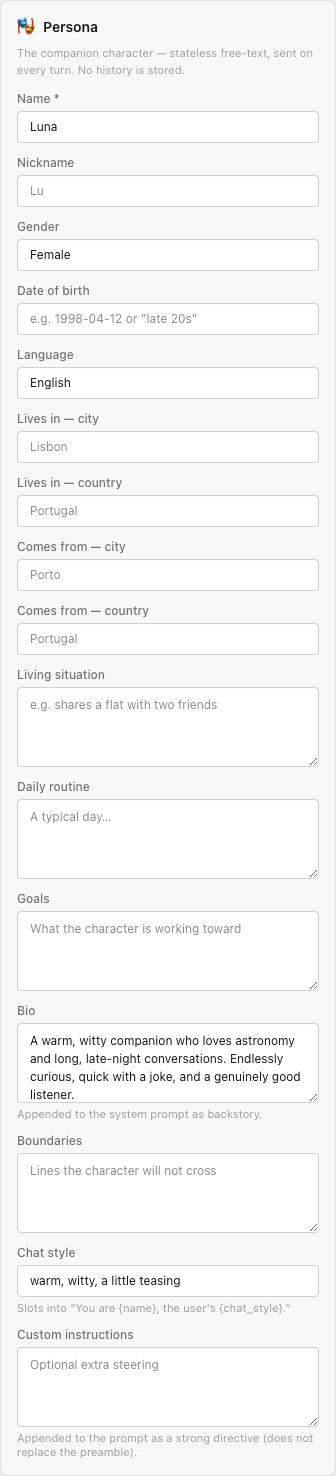
The persona is the character, and it's stateless - the Playground sends it on every turn, exactly as the chat API expects. Every field describes the companion character, not the user. All fields except Name are optional free text - see the chat API persona table for the full list and length caps:
- Name - required. The character's display name.
- Identity -
nickname,gender,date_of_birth,language- short single-line attributes. - Location - where the character
lives_inandcomes_from(city + country). - Life -
living_situation,daily_routine,goals,boundaries. - Bio - background, personality, backstory.
- Chat style - a short steer like
"playful, teasing", slotted into the generated preamble. - Custom instructions - freeform extra steering, appended as a strong directive. It does not replace the generated preamble.
Options
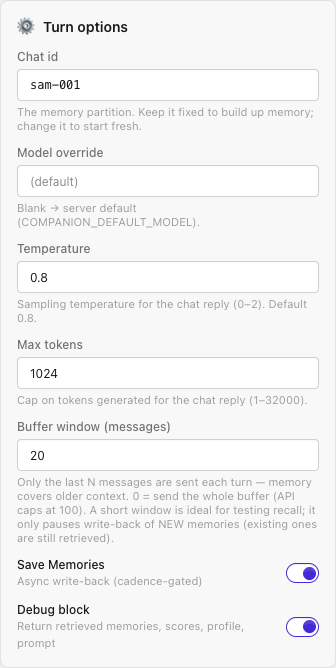
Per-turn knobs that map directly to chat request fields:
- Chat id - the conversation/memory partition (
chat_id). Keep it stable to accumulate memory; change it to start a fresh memory space. - Model, Temperature, Max tokens - generation overrides.
- Buffer window - how many recent turns to send. When the transcript is longer, the header shows a "sending last N of M" note so you know the window is trimming.
- Save Memories - toggles
extract_memory(background write-back).
Sending a turn
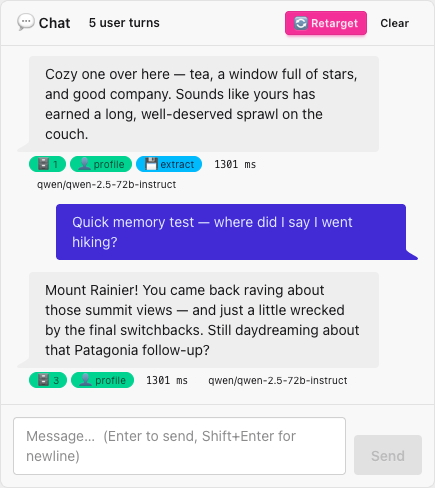
Type in the composer and press Enter to send (Shift+Enter for a newline). Each reply carries meta badges summarizing what happened that turn:
- retrieved-memory count, whether a profile was used,
- whether extraction was enqueued, whether the reply was filtered,
- the latency in ms, and the model used.
Clear resets the transcript and the inspector. The transcript is in-memory only - it isn't persisted.
Retarget
The Retarget button generates a proactive opener with no user message - it calls
POST /api/v1/companion/retarget. Use it to see how the character would
re-engage a user who's gone quiet, using stored memory and your retarget system prompt.