Connecting
Two cards in the left sidebar get you connected: Connection and Vector store.
Connection
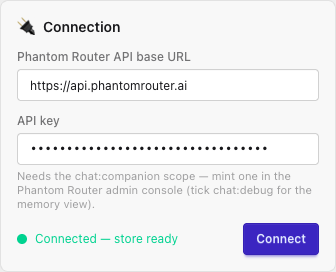
- Phantom Router API base URL - where the API lives:
https://api.phantomrouter.ai. - API key - a Bearer key with the
chat:companionscope. - Connect - verifies the key by calling
GET /api/v1/me/vector-store.
The status pill tells you where you stand:
| Pill | Meaning |
|---|---|
| Connected - store ready | Key is valid and a vector store is configured. You can chat. |
| Authed - no store | Key is valid, but no vector store yet. Configure one below. |
| Unauthorized | The key is missing or invalid, or lacks chat:companion. |
| Not connected | You haven't connected yet. |
Your base URL and key are saved in the browser's localStorage - they never leave your machine
except as requests to the API you pointed at.
Vector store
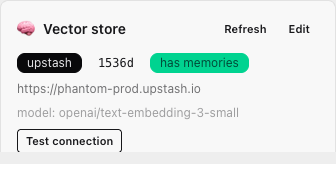
Phantom Router needs a vector store. The Vector store card shows the current config and lets you set or rotate it. Click Configure (or Edit) to open the form:
- REST URL - your Upstash Vector index URL.
- REST token - the index token (write-enabled).
- Embedding model (optional) - defaults to
openai/text-embedding-3-small(1536 dims).
Then:
- Save & probe -
PUTs the config and test-probes the connection before saving. - Test connection - re-probes the saved store without changing it.
- Refresh - re-reads the current config from the API.
Once saved, the card shows the provider, embedding dimensions, the index URL, and whether the
store has memories yet (empty until the first extraction writes vectors).
The Playground only supports the upstash provider, matching the API. See the
vector store reference for constraints (the embedding model and dimension
are pinned once memories exist).