The Playground
The Playground is a developer console for Phantom. You point it at the chat API with your own API key, send turns with a fully editable persona, and inspect each turn live - the exact request and response JSON, the HTTP status, and the round-trip latency.
It's the fastest way to understand how a persona, the message buffer, and memory interact before you wire the API into your own backend.
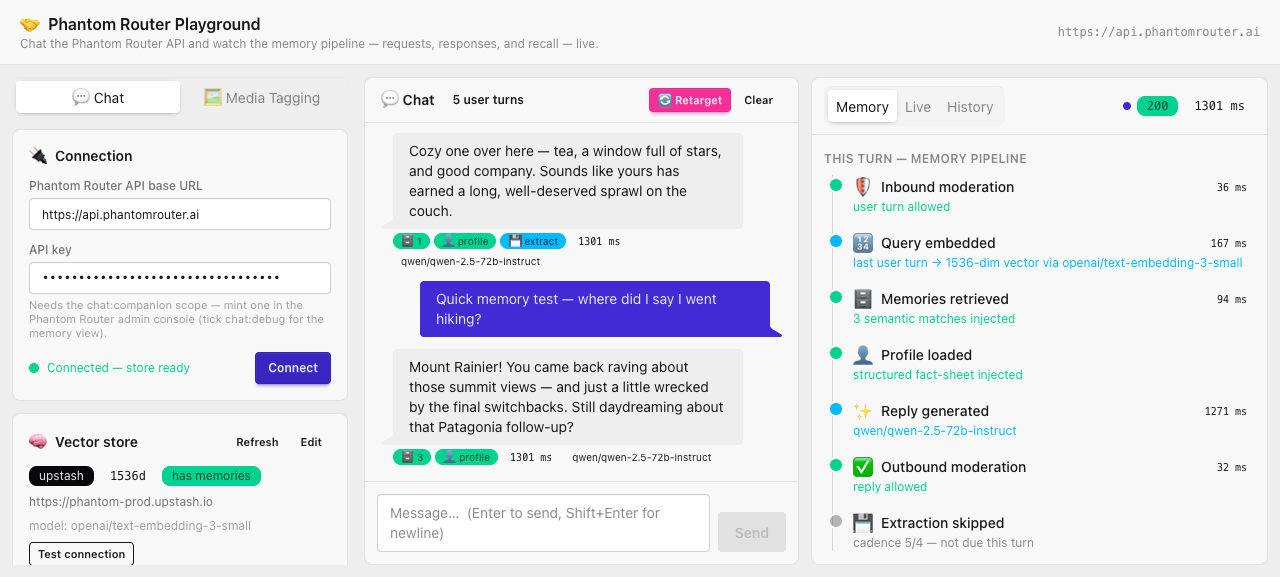
Layout
The console is three columns:
- Left - configuration. Your connection (base URL + API key), your vector store, the persona, and per-turn options.
- Center - chat. The transcript, per-reply badges, and the composer. Also the Retarget button for proactive openers.
- Right - inspector. Two tabs: Live (the raw request/response) and History.
Getting in
Open the Playground and paste in your credentials:
- URL: playground.phantomrouter.ai
- Set the base URL to the Phantom API (
https://api.phantomrouter.ai). - Paste an API key with the
chat:companionscope. See Authentication. - Configure your vector store in the left sidebar.
Nothing is sent anywhere except directly from your browser to the API you point it at - the key
lives only in your browser's localStorage.
Next
- Connecting - wire up your key and vector store.
- Chatting - personas, options, and sending turns.
- Inspecting requests - the raw request/response tabs.